We may earn a commission when you buy through links on this page, at no extra cost to you. How we make money.
Turn one laptop into a two- or three-screen workstation. We compared more than 40 laptop screen extenders, portable monitors and adapters on the things that decide whether they work for you — your laptop’s ports, its size, your Mac’s chip, weight and screen quality.
Our shortlist across every type — triple, single, one-cable and touch. Every card shows which laptops it works with, so you can rule out the wrong models at a glance.
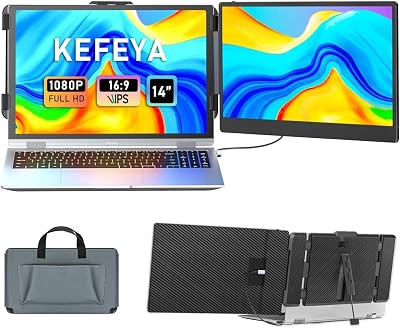
Two 15.6-inch Full HD IPS panels fold out from a 0.16-inch frame and turn a 13–17.3-inch laptop into a three-screen workstation. 100% sRGB colour, 300 nits, 3.9 lb and a leather carry bag. KEFEYA is the best-selling brand in this category on Amazon.
✓ Windows✓ Mac M4+ / Pro / Max! Base M1–M3 Mac: 1 screen without a DisplayLink adapter
The most-bought laptop screen extender on Amazon right now. One 14-inch Full HD IPS screen at 300 nits with 180° rotation, mirror, extend and portrait modes. USB-C, USB-C-to-USB-A and HDMI cables in the box; no driver.
Both 15.6-inch screens run over a single USB-C (or USB-A) cable thanks to a DisplayLink-style driver, so it works on laptops with only one video port and on base-chip MacBooks. Kickstand tilts to 90°, each screen rotates to portrait. Not for game consoles.
✓ Windows✓ Every Apple-silicon Mac (DisplayLink driver)✓ ChromeOS
Taller 16:10 panels at 1920×1200 give noticeably more vertical room for documents, spreadsheets and code than 16:9 screens. About 4 lb and 0.2 inch thin, driver-free over two full-featured USB-C ports or HDMI + USB-C.
✓ Windows✓ Mac M4+ / Pro / Max! Base M1–M3 Mac: 1 screen without a DisplayLink adapter
One of the fastest-selling triple extenders right now. Slim aluminium frame (about 4 lb, 0.19 inch) for 12–17.3-inch laptops, extend/mirror/portrait modes, and the box includes cables, a power adapter and a carry bag.
✓ Windows✓ Mac M4+ / Pro / Max! Base M1–M3 Mac: 1 screen without a DisplayLink adapter
At 1.3 lb and 0.17 inch, one of the lightest extenders you can carry. 14.1-inch 1080P IPS screen with TÜV SÜD-certified low blue light, carry bag, all cables and a 24-month warranty.
The brand that created the tri-screen category. A patented tension-fit frame (no magnets or adhesive), one embedded USB-C cable for both screens, 60 W pass-through charging and an aluminium build at 3.6 lb. US-based support and a 1-year warranty. Premium price.
✓ Windows✓ Every Apple-silicon Mac (DisplayLink driver)✓ ChromeOS
Two 14-inch side screens for 13.3–16.1-inch laptops. On a laptop with a video-capable USB-C port, one cable carries video and power to both screens without a driver. Matte 300-nit panels, folds flat.
✓ Windows✓ Mac M4+ / Pro / Max! Base M1–M3 Mac: 1 screen without a DisplayLink adapter
A sharper 2K 14-inch IPS screen on a patented hinge with 360° vertical and 210° horizontal rotation and gravity-sensing auto-rotation. Detachable and driver-free. No built-in speakers.
Both side screens support 10-point touch: tap, swipe, zoom and annotate. 1920×1200 IPS panels at 400 nits and 100% sRGB. After installing the DisplayLink and touch driver, one USB-C cable carries power, video and touch; two mini-HDMI inputs suit older laptops.
✓ Windows✓ Every Apple-silicon Mac (DisplayLink driver)✓ ChromeOS
Price bands: $ under $100 · $$ $100–200 · $$$ $200–300 · $$$$ over $300 (approximate; check the current price on Amazon).
What Is a Laptop Screen Extender?
A laptop screen extender is a slim portable monitor built to attach to your laptop. A bracket or frame rests against the back of the lid, and the screen slides or folds out to the side at the same height as your laptop display. A kickstand behind the frame carries most of the weight. In a few seconds you have a dual-monitor setup — or, with a triple extender, three screens — on any desk, kitchen table or hotel room.
Electrically it is simply an external monitor. It receives video over USB-C (from a port with DisplayPort Alt Mode, Thunderbolt or USB4) or over HDMI, and takes power over USB. Your operating system treats it like any other monitor, so you can extend the desktop, mirror it or rotate a screen to portrait.
Single, triple and one-cable extenders
Single-screen extenders add one display. 1.3–2.5 lb, one cable, work with almost every laptop and every USB-C MacBook.
Triple-screen extenders add two displays, one on each side. Around 4 lb for 15.6-inch models; they need two video outputs from your laptop.
One-cable triple extenders run both screens over one cable using a DisplayLink driver — the answer for laptops with one video port and for base M1/M2 MacBooks.
Who uses them?
Remote and hybrid workers who move between home and office, traders following several charts, developers keeping code, documentation and a browser visible, accountants comparing spreadsheets, students, and anyone who takes video calls while working on a document. If you work from a laptop most days but don’t always have a desk monitor, an extender is one of the most useful upgrades you can make.
How to Choose a Laptop Screen Extender
1. Check your ports
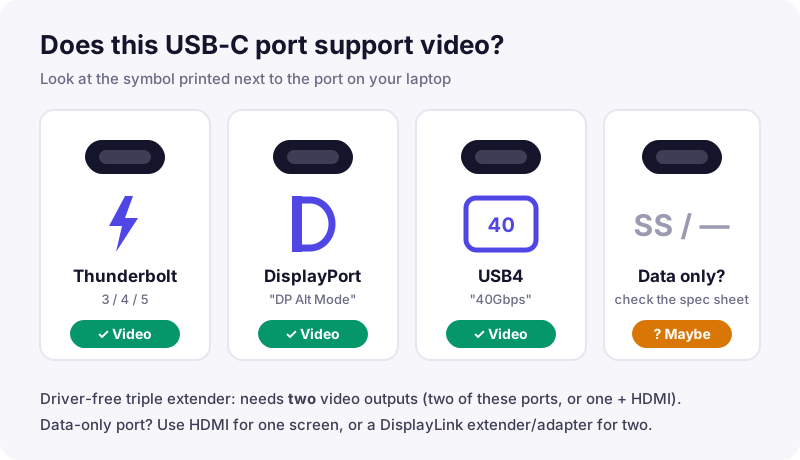
A driver-free triple extender needs two video outputs: two full-featured USB-C ports, or one USB-C plus HDMI. A charging-only USB-C port shows “No signal”. Look for a Thunderbolt (lightning) or DisplayPort (D) symbol, find your model in our laptop compatibility list, or read how to check if your USB-C port supports video.
Thunderbolt, DisplayPort and USB4 ports carry video; a port with only an SS symbol or none may be data-only.
2. Check your Mac’s chip
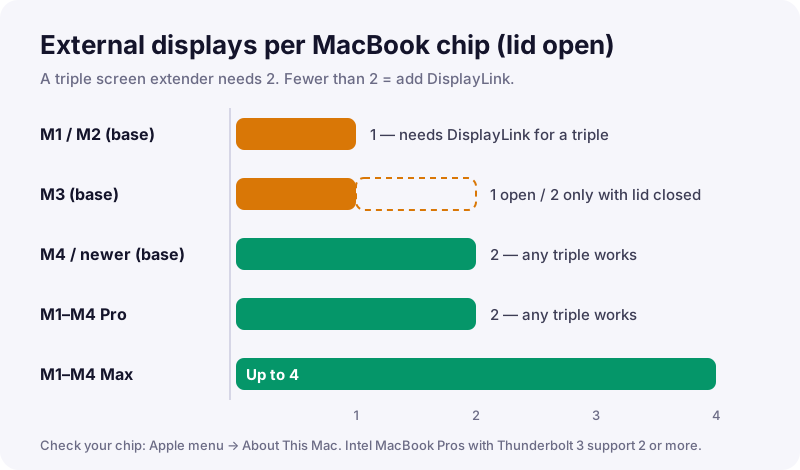
MacBooks with a base M1 or M2 chip support one external display; base M3 MacBooks (Air and 14-inch Pro) support two only with the lid closed. On those Macs pick a single extender, a one-cable DisplayLink triple, or add a DisplayLink adapter. See MacBook screen extenders.
External displays supported with the lid open, by MacBook chip. Fewer than two means a triple extender needs DisplayLink.
3. Match the size
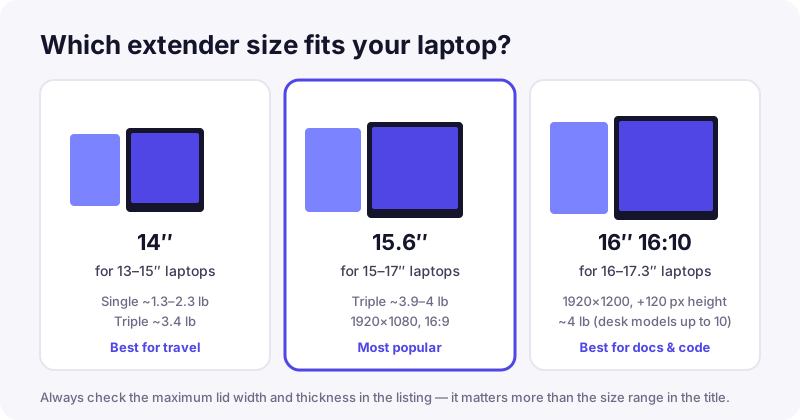
14-inch extenders suit 13–15-inch laptops; 15.6- and 16-inch extenders suit 15–17.3-inch laptops. The lid’s width and thickness matter more than the size range in the title.
Match the extender to your laptop: 14″ for 13–15″, 15.6″ for 15–17″, 16″ 16:10 for 16–17.3″ laptops.
4. Single or triple
One extra screen is lighter, cheaper and works almost everywhere. Two extra screens give the most space for data, code and trading. Still unsure? Read dual vs triple.
5. Weight and where you work
Travel models weigh 1.3–1.8 lb; 15.6-inch triples about 4 lb; heavy 16-inch desk frames up to 10 lb. Use the kickstand, and consider a laptop stand.
6. Screen quality
Full HD IPS is standard. 16:10 panels (1920×1200) add vertical space, 2K adds sharpness, touch helps annotation. For 4K, OLED or high refresh rates, look at portable monitors.
Will it work with your laptop?
Four questions about your laptop, ports and Mac chip — and we show you the extenders that fit.
A laptop screen extender is a portable monitor that attaches to the back of your laptop lid and slides or folds out beside the built-in screen. Single models add one screen; triple models add two, so you work across three displays.
Over a USB-C cable from a port that supports video (DisplayPort Alt Mode, Thunderbolt or USB4), or over HDMI with a USB cable for power. One-cable triple models use a DisplayLink driver and can run from any USB port.
It works if your laptop has a video-capable USB-C port or HDMI and the lid fits the bracket. A driver-free triple extender needs two video outputs and a laptop that supports two external displays. Our compatibility checker tells you which type fits.
Yes. Single-screen extenders work on every USB-C MacBook. For a triple extender, base M1/M2 MacBooks (and base M3 models with the lid open) support only one external display, so choose a DisplayLink model or add a DisplayLink adapter. M4 and newer MacBooks and Pro/Max chips support two.
Most single and two-cable triple extenders are plug-and-play. One-cable triple models such as the KYY X90D, and touch models such as the Prechen, need a DisplayLink driver.
Not when used correctly. The bracket clamps gently and the kickstand carries the weight. Avoid heavy triple models on very thin laptops, and fold the extender before closing the lid.
On Amazon most single-screen extenders sit under about $120, triple extenders mostly between $200 and $300, and premium brands such as Xebec and Mobile Pixels above $300. Prices change often, so check the current price on Amazon.
Match your laptop: a 14-inch extender for 13-15-inch laptops, 15.6-inch or 16-inch for 15-17.3-inch laptops. Always check the maximum lid width in the listing.
A screen extender attaches to the laptop and needs no desk space, ideal for travel and small tables. A portable monitor stands on its own and offers more screen types, such as 4K, OLED and 144 Hz.
Yes, if the Chromebook has a USB-C port with video output. ChromeOS also supports DisplayLink natively, so one-cable models work too.