Black Friday 2026 is coming — see laptop screen extender deals →
Screen extender accessories background: USB-C cable and charger on a desk

Screen Extender Accessories

We may earn a commission when you buy through links on this page, at no extra cost to you. How we make money.

The right accessory solves the three most common screen-extender problems: a Mac that only shows one extra screen, running out of USB-C ports, and neck strain from looking down at a laptop. These are the add-ons buyers pair with extenders most often.

Updated October 2026 · 12 models compared

Accessories at a Glance

Accessories at a Glance
ModelScreenResolutionConnectionDriverWeightPriceLink
WAVLINK USB-C to Dual HDMI DisplayLink Adapter—2× 4K 60 HzUSB-C or USB-AYes—$$Amazon
Plugable USB-C to Dual HDMI Adapter (DisplayLink)—2× 4K 60 HzUSB-CYes—$$Amazon
StarTech USB-A 3.0 to Dual HDMI Adapter—4K30 + 1080p60USB-A 3.0Yes—$$Amazon
UGREEN 5-in-1 USB-C Hub, 4K HDMI, 100W PD—4K HDMIUSB-CNo—$Amazon
Anker 5-in-1 USB-C Hub with 4K HDMI—4K HDMIUSB-CNo—$Amazon
UGREEN Revodok Pro 6-in-1 USB-C Hub, 10 Gbps—4K 60 HzUSB-CNo—$Amazon
Anker Prime 14-in-1 Docking Station—Dual 4KUSB-CSee listing—$$$$Amazon
SOUNDANCE Aluminium Laptop Stand—————$Amazon
Nulaxy Adjustable Laptop Stand—————$Amazon
Amazon Basics Portable Laptop Stand—————$Amazon
Tonmom Adjustable Laptop Stand—————$Amazon
tounee Telescopic Sit-Stand Laptop Stand—————$$Amazon

Price bands: $ under $100 · $$ $100–200 · $$$ $200–300 · $$$$ over $300 (approximate; check the current price on Amazon).

USB-C Hubs & Docks

When the extender takes your USB-C ports, a hub gives back charging, USB-A and an HDMI output.

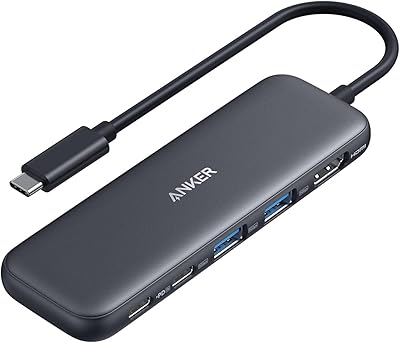
Anker 5-in-1 USB-C Hub with 4K HDMI

5Anker 5-in-1 USB-C Hub with 4K HDMI

$Anker
  • 4K HDMI
  • 85 W pass-through
  • 2× USB-A
  • Best seller

Frees up ports when your extender uses the laptop’s USB-C: 4K HDMI, a 5 Gbps USB-C data port, two USB-A ports and up to 85 W pass-through charging. One of Amazon’s best-selling hubs.

✓ Windows✓ Mac✓ One external display via HDMI

Read customer reviews on Amazon →
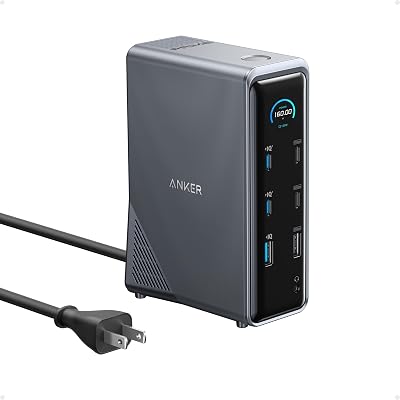
Anker Prime 14-in-1 Docking Station

7Anker Prime 14-in-1 Docking Station

$$$$Anker
  • 14 ports
  • 160 W charging
  • Dual 4K displays
  • Desk dock

A full desk dock: 14 ports, 160 W total output (three USB-C ports at up to 100 W), 10 Gbps data and dual 4K displays — for a home office where the laptop and extender stay plugged in.

✓ Windows✓ Mac✓ One external display via HDMI

Read customer reviews on Amazon →

Laptop Stands

Raise the laptop and extender closer to eye level, and keep the base steady under the extra weight.

Which Accessory Do You Need?

  • “Only one screen of my triple extender works on my MacBook” → a DisplayLink adapter (WAVLINK or Plugable). Connect the extender’s two HDMI cables to it.
  • “My Windows laptop has no video USB-C” → the StarTech USB-A 3.0 dual-HDMI adapter, or a one-cable DisplayLink extender.
  • “The extender uses both my USB-C ports and I can’t charge” → a USB-C hub with power-delivery pass-through. Note: the hub’s own HDMI port adds one display, it does not multiply displays.
  • “My neck hurts” → a laptop stand plus an external keyboard and mouse. Choose a sturdy, dual-rod or thick aluminium stand: a triple extender adds about 4 lb at the top.
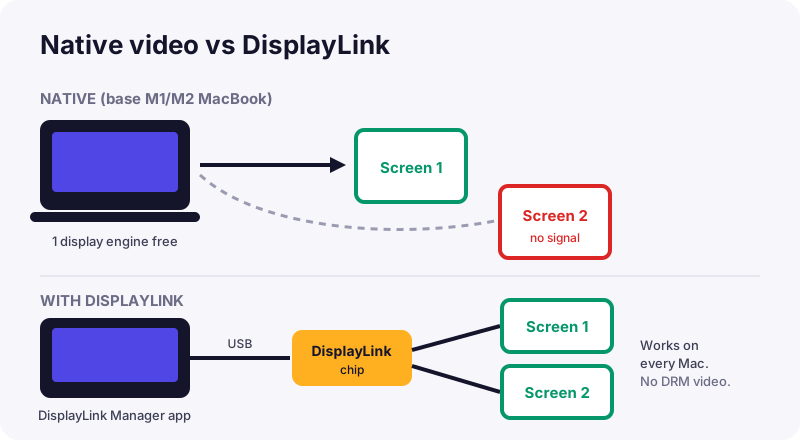
Diagram comparing native video output with DisplayLink on a MacBook
Native output is limited by the chip; DisplayLink sends the picture over USB to its own chip and drives two screens on any Mac.

DisplayLink caveats

DisplayLink needs a driver (DisplayLink Manager on Mac), uses a little CPU, and DRM-protected streaming apps usually won’t play on DisplayLink screens. For spreadsheets, browsers, code and video calls it works perfectly. Read DisplayLink explained.

Frequently Asked Questions

A USB adapter with its own graphics chip that adds one or two HDMI displays to a computer. It needs the DisplayLink driver and lets base M1/M2 MacBooks drive more than one external screen.

No. A normal USB-C hub with HDMI still counts as the Mac native display output, so a base M1/M2 Air stays limited to one external screen. Only a DisplayLink adapter gets around the limit.

A sturdy stand with a wide base and solid arms, such as the SOUNDANCE or Nulaxy, handles the extra weight of an extender. Unfold the extender kickstand onto the stand platform if there is room.

Only if the extender occupies the ports you need for charging or accessories. Choose a hub with 85-100 W power delivery pass-through.

Laptop compatibility checker background: close-up of a computer screen

Not sure it will work with your laptop?

Answer four quick questions and get a recommendation that fits your ports.

Open the Compatibility Checker